
Download Clarizen Project Management Software – Cloud‑Based Collaboration, Time Tracking, and Roadmap Tool
Overview – Why Clarizen Stands Out in the Crowded Project Management Landscape
Clarizen Project Management Software is a cloud‑based, enterprise‑grade solution designed to help teams plan, execute, and deliver projects with a high degree of visibility and control. Unlike many desktop‑only tools, Clarizen lives in the browser, which means you can access your work from any device—whether you’re on a Windows laptop at the office, a MacBook at home, or a mobile phone on the go. The platform combines a robust set of features—roadmaps, time‑tracking, resource management, and built‑in reporting—with a library of ready‑made templates that reduce the learning curve for new users.
While the interface can feel dense at first glance, the depth of functionality pays off quickly once you become familiar with the layout. Integration points with Google Docs, iCalendar, Outlook, and other SaaS products make it easy to pull data into Clarizen or push updates back to the tools your organization already trusts. In short, Clarizen delivers a flexible, secure, and highly collaborative environment that scales from small teams to global enterprises.
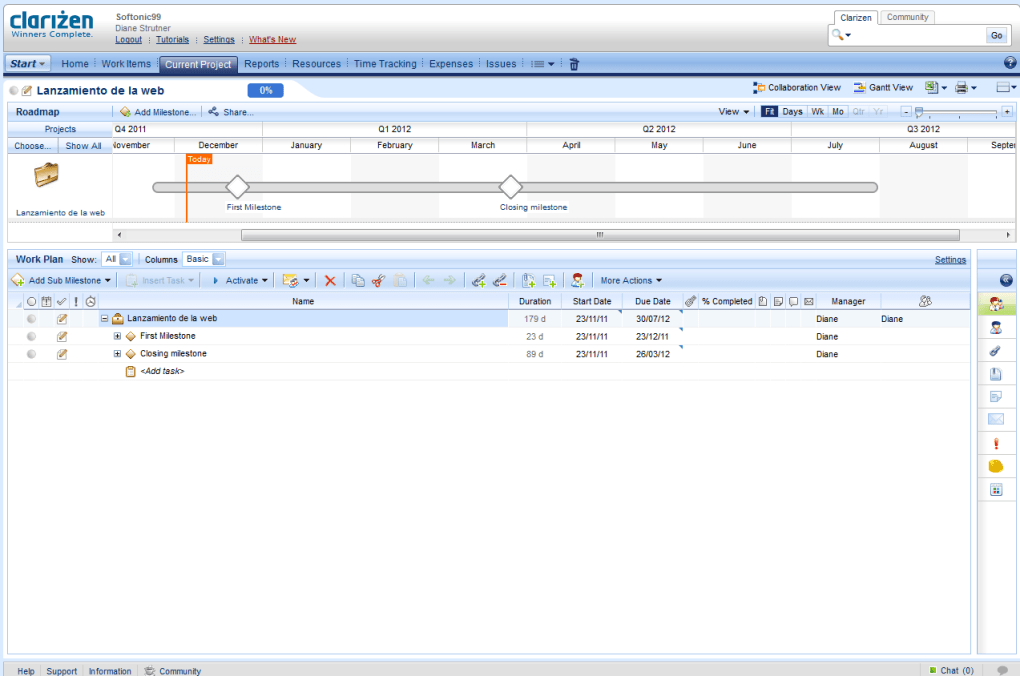
For businesses looking for a single source of truth for project data, Clarizen’s cloud architecture ensures that every change is saved in real time, eliminating version‑control headaches. The platform also supports advanced governance features such as role‑based permissions, audit trails, and compliance reporting, which are essential for regulated industries. Whether you’re managing a product launch, an IT rollout, or a marketing campaign, Clarizen gives you the roadmap view to see milestones, dependencies, and progress at a glance, while still allowing granular control over tasks, budgets, and timelines. This blend of macro‑level visibility and micro‑level detail is what makes Clarizen a compelling choice for organizations that demand both strategic oversight and operational precision.
Core Features & Benefits
- Dynamic Roadmaps – Drag‑and‑drop timeline views that show milestone progress, critical path, and resource allocation.
- Template Library – Pre‑built project templates for IT, marketing, professional services, and more, reducing setup time by up to 50%.
- Time & Expense Tracking – Integrated timesheets and expense logs that feed directly into budgeting and invoicing modules.
- Collaboration Hub – Real‑time comments, file attachments, and discussion threads linked to tasks and milestones.
- Robust Reporting Engine – Custom dashboards, scheduled PDF/Excel exports, and KPI widgets for executive visibility.
- Third‑Party Integrations – Native connectors for Google Docs, Microsoft Outlook, iCalendar, Salesforce, and Jira.
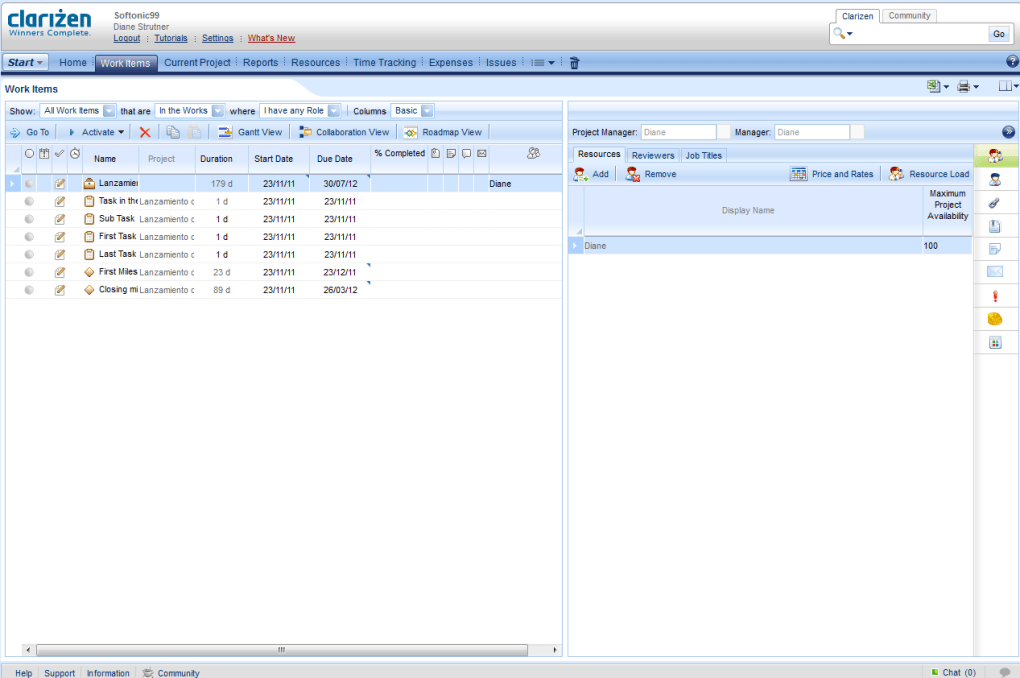
- Resource Management – Visual capacity planning, skill‑based assignment, and conflict resolution tools.
- Security & Compliance – Role‑based access, SSO, ISO 27001 certification, and GDPR‑ready data handling.
Pros
- Highly customizable dashboards give stakeholders the exact data they need.
- Cloud‑first architecture ensures seamless updates and minimal IT overhead.
- Deep integration ecosystem reduces data silos across the organization.
- Scalable licensing model works for both mid‑size firms and large enterprises.
- Strong governance features support regulated industries.
Cons
- Initial learning curve can be steep for users new to enterprise PM tools.
- Pricing is positioned toward the higher end of the market.
- Advanced features may require additional configuration or consulting.
- Mobile app, while functional, lacks some of the desktop’s full‑screen reporting capabilities.
Clarizen delivers a comprehensive suite of project management tools that cater to both strategic planning and day‑to‑day execution. Its biggest strengths lie in the dynamic roadmaps and deep integration options, which together create a unified workspace for cross‑functional teams. While the platform’s pricing and learning curve may deter smaller businesses, the ROI for organizations that fully adopt its capabilities is significant.
Installation, Usage & Compatibility
Because Clarizen is a cloud‑native SaaS, there is no traditional “installation” process on the client side. Getting started is as simple as creating an account, verifying your email, and logging into the web portal at clarizen.com. The onboarding wizard will prompt you to select a template or start from scratch, and you can immediately invite team members via email. For organizations that prefer single sign‑on (SSO), Clarizen supports SAML 2.0, Okta, Azure AD, and other identity providers, allowing you to manage user access centrally.
Step‑by‑Step Quick Start
- Sign Up – Choose the trial or paid plan that matches your headcount.
- Configure Domain – If using SSO, link your identity provider under “Settings → Security”.
- Select a Template – Pick a pre‑built project type (e.g., “Software Development” or “Marketing Campaign”).
- Add Resources – Upload a CSV of users, assign roles, and set capacity limits.
- Build Your Roadmap – Drag milestones onto the timeline, define dependencies, and set target dates.
- Invite Stakeholders – Send invitation links; they’ll receive a secure login page.
- Start Tracking – Log time, attach files, and use the discussion thread to keep communication in one place.
Supported Operating Systems
Clarizen runs on any modern browser, which means it is fully compatible with Windows 10/11, macOS Monterey and later, Linux distributions (via Chrome/Firefox), as well as mobile platforms such as Android 8+ and iOS 13+. The responsive design ensures that the same feature set is available whether you are on a desktop, tablet, or smartphone.
Best Practices for Ongoing Use
To keep your projects running smoothly, schedule a weekly “roadmap review” where project managers validate milestone dates and re‑allocate resources as needed. Take advantage of the automated email notifications for overdue tasks and upcoming deadlines—these can be customized in the “Notification Settings” area. For larger teams, consider creating “Project Portfolios” to group related initiatives and generate executive‑level dashboards. Finally, enable the API key in the “Integrations” tab if you need to push data to external BI tools or custom reporting platforms.
Frequently Asked Questions
Is Clarizen free to use for small teams?
Clarizen offers a 30‑day free trial for all plans, but there is no permanent free tier. After the trial, pricing starts based on the number of users and required feature set, making it more suitable for medium to large teams that need enterprise‑grade capabilities.
Can I import existing projects from Excel or Microsoft Project?
Yes. Clarizen includes a CSV import wizard that maps columns to tasks, resources, and dates. There is also a dedicated connector for Microsoft Project that preserves task hierarchies and dependencies during migration.
How secure is my data on Clarizen’s cloud?
Data is encrypted both in transit (TLS 1.2) and at rest (AES‑256). Clarizen complies with ISO 27001, SOC 2 Type II, and GDPR standards, and offers role‑based access controls, SSO, and detailed audit logs to meet strict security requirements.
Does Clarizen integrate with my existing CRM system?
Clarizen provides native connectors for Salesforce, Microsoft Dynamics, and HubSpot. If a direct integration is not available, the open API allows developers to build custom sync processes.
What kind of support does Clarizen offer?
Customers receive 24/7 email support, a dedicated account manager for enterprise contracts, and access to an online knowledge base, video tutorials, and community forums. Premium plans also include phone support and a guaranteed response time within two hours.
Conclusion – Is Clarizen the Right Choice for Your Team?
Clarizen Project Management Software delivers a powerful blend of strategic roadmapping, granular task control, and seamless integration that few competitors can match. Its cloud‑first design means you can collaborate from anywhere, while the extensive security and compliance features give peace of mind to regulated industries. If your organization values deep customization, enterprise‑grade reporting, and a single source of truth for project data, Clarizen is a solid investment. The main trade‑offs are the higher price point and a learning curve that may require initial training or consulting. For teams ready to scale their project management maturity, the benefits far outweigh these considerations.
Ready to experience the clarity of Clarizen? Click the button below to start your free trial, explore the templates, and see how the platform can transform your project workflows.



.png)



